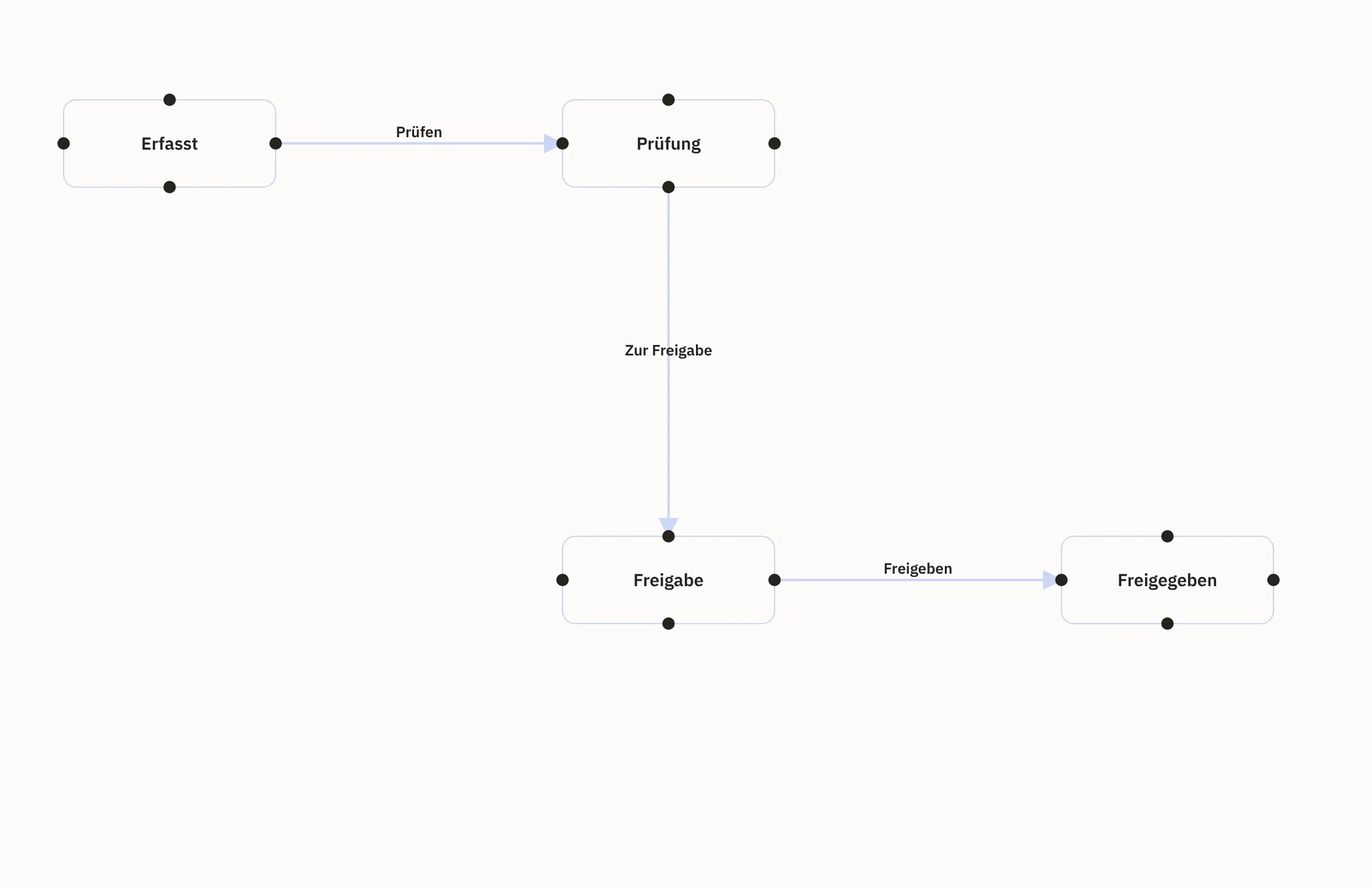
Approvals with clear responsibility
An approval is a step of its own in the workflow. The people responsible receive a notification, and the case moves on.

Products · Workspace
You define once who approves what and what happens next. Workspace guides your team through these steps and keeps prices and decisions on the case. In the reports you see which orders lie behind a figure.
View from our demo environment with sample data.
An approval is a step of its own in the workflow. The people responsible receive a notification, and the case moves on.
In the designer, your team sees how a workflow is meant to run. Only the steps that are currently allowed are offered.
Every step is recorded, and prices and taxes stay stored on the case.
Key figures lead straight to the related cases. So you see which orders lie behind a figure.
Together we define which steps a case goes through and who approves which step.
In the graphical designer, you see the workflow as a diagram of states and transitions.
Your team works on the case. Only the steps that are currently allowed are offered, and the people responsible receive a notification.
Every step is recorded. In the reports you see where cases stand and where they are stuck.
You maintain states, transitions and actions as a diagram. So your team sees how a workflow is meant to run.
An approval is a transition of its own in the workflow. Roles and conditions govern who may trigger it.
The logic of supplied workflows stays protected. You adapt the layout of the diagram to your working view; if you need different logic, you deliberately create it as a workflow of your own.
Every workflow has versions, and a locked version cannot be rebuilt afterwards.
A transition can trigger a notification or call a webhook approved for this purpose. The call only starts once the new status has been saved.
If an action fails, Workspace retries it according to your rule. Persistent errors end up in a list of their own; once the cause is fixed, you repeat the step specifically.
Notifications appear on the dashboard and by email. You adapt the texts as a template for each language, and every employee chooses what they are informed about and how often.
Workspace stores prices and tax rates with every quote, every order and every invoice so they cannot be changed. When a quote becomes an order, the agreed values continue to apply. Nothing is silently recalculated, and the price that applied in June is still on the document later on.
Obligations from contracts, customer requirements or internal rules have an area of their own. There you link a requirement to the contract it comes from and set up controls with a review interval and responsibility. You attach its evidence to every review, such as a file or an inspection report. Reports show overdue reviews, expiring contracts and missing evidence.
Because status changes go through the workflow and not through a freely editable field, it remains visible who decided what and when.
The cockpit brings together signals from sales, trade, warehouse and purchasing, each as a traffic light: unremarkable, follow up or decide.
For every alert, you see the values that triggered it. A link takes you to the area in which your team clarifies the cause.
Reports on pipeline, forecast and targets, deal quality and team performance, plus sales opportunities that have not moved for some time.
Revenue, cost of goods, contribution margin and margin per period, compared with the previous period or the previous year if you wish.
Payments, shipping, returns and document delivery as regular reports.
If, for example, your accounting is not connected for liquidity figures, Workspace shows this. A missing figure is not estimated.
The AI in Workspace makes suggestions: product texts, a classification of incoming messages or pointers on a lead. Your team checks the result and decides what to adopt.
For each task you define which model works on it, including a model on your own server. An external provider only receives texts containing personal data if you explicitly set this up, and then with masked details.
You also set a budget for your models. Once it is used up, Workspace stops using that model. If there is no other permitted route, no suggestion is produced.
Every employee sees and changes only what belongs to their task. Administrators see which permissions actually apply.
You secure sign-in with a second factor, for the whole company or for individual accounts.
Reviews and evidence attached to a contract are visible only to those who may also see the contract.
For every AI task, it is recorded which model processed it or why none ran. The content of the request is not logged.
You can lock the evidence of a workflow. As long as the lock applies, Workspace does not delete it.
Pipeline, forecast and targets flow from day-to-day sales work straight into the reports.
See sales and customersQuote, order and invoice carry the stored prices and tax rates that you can prove later.
See orders and documentsAvailability and procurement appear as a signal in the cockpit, with the route to the affected cases.
See purchasing and warehouseAnyone mentioned in a task, a comment or the wiki receives a notification that stays open until it is dealt with.
See collaboration and knowledgeNo. You maintain workflows in the graphical designer. We handle the initial set-up with you, because it determines who decides what.
It chooses from a vetted selection of actions and calls the addresses you have approved via webhook. This keeps every step traceable. If your workflow needs another action, we develop it for you.
For day-to-day work: they show where something is stuck and lead your team to the cases behind it. If figures from other systems are to be added, we connect them for you.
Only if accounting, bank data and open items are connected. Otherwise the key figure appears as an open data source and not as an estimate.
Workspace organises obligations, controls and evidence, reminds you of deadlines and records who reviewed what. On this basis, the people responsible in your company assess whether an obligation has been met.
Your team. The AI makes suggestions; your employees check and decide.
We quote the price in an offer, because it depends on the scope, such as the areas used and the storage. We will publish fixed prices as soon as they are set.
Tell us about a workflow that should get fixed steps and clear approvals. In a demo, we show you how it runs in Workspace with fixed steps and a traceable history.