Every enquiry becomes a lead
Enquiries by email or contact form arrive in Workspace as a lead, with an owner and a next step.

Products · Workspace
Customers, leads, opportunities and quotes sit in one place in Workspace, and every morning your sales team sees whom to call and why. An email becomes a quote, and an accepted quote becomes an order.
Enquiries by email or contact form arrive in Workspace as a lead, with an owner and a next step.
When you create a record, Workspace points out possible duplicates.
A single search finds contacts, companies, leads, quotes and orders.
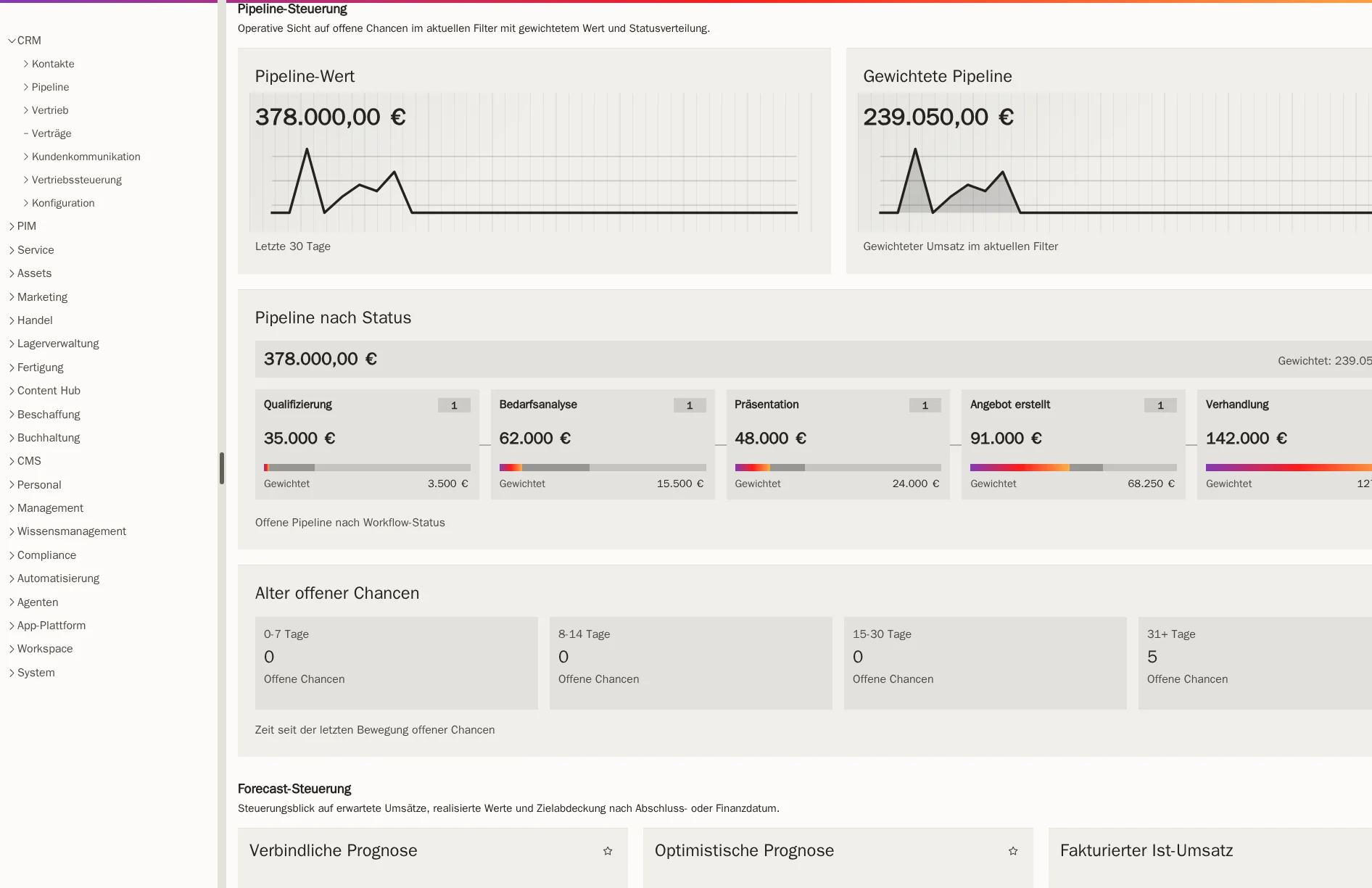
Every opportunity has revenue, a stage and a probability. Workspace shows dormant opportunities so you can follow up.
An enquiry arrives by email or contact form and is recorded as a lead. Workspace points out possible duplicates.
Your team converts the lead into a company or person and creates an opportunity for the requirement, with expected revenue, stage and planned close date.
The quote is created on this opportunity, with the customer’s prices and a validity date.
If the customer accepts, the quote becomes an order and the opportunity counts as won.
You maintain people and companies separately and link them through employment. That makes it clear who your contact is at which company.
A company with several locations remains one customer. For each location you store addresses and, if needed, separate payment terms.
You can enter several websites, email addresses or phone numbers at once. Workspace reads public information such as the imprint and shows whether the contact already exists.
On request, Workspace checks a lead’s company in public sources and suggests details. Your team chooses what to adopt.
Every opportunity has a customer, expected revenue, a stage and a probability. Workspace specifically highlights dormant opportunities for follow-up.
You create and send quotes from Workspace. Prices and taxes are saved with the quote and are not silently recalculated later.
If your customer uses their own item numbers and descriptions, these appear on their quotes and documents.
You find contacts, companies, leads, quotes and orders through a single search field.
If a customer asks for a quote by email, you take the email straight from the inbox. If the customer already exists, the opportunity and quote are created on their company. If they are new, Workspace creates the lead, opportunity and quote together.
The email stays attached to the quote, so everyone can see what it responds to. When the customer later sends their order confirmation, you assign that email to the quote too and set it to accepted.
Contact management puts due calls, call-backs and quotes to follow up in one list that you work through from the top. For each contact you see the phone number, email address, the company’s open quotes and opportunities, and the reason for the call. After the conversation you choose an outcome or schedule a call-back, and the list moves on to the next contact.
Your notes are filed with the customer, the lead or the quote, not in a separate list. If several colleagues are working on the same company, Workspace points this out. Only one person can take a contact from the team list, so nobody calls twice.
Team leaders see how much open work lies with which team and who is currently available. For this, Workspace reads working hours and approved absences.
The total of all open opportunities, alongside the pipeline weighted by probability of closing.
Your team classifies each opportunity, for example as committed or as possible. Workspace does not set this assessment on its own.
You maintain targets per period, person or team and compare them with the pipeline and invoiced revenue.
Win rate, won and lost opportunities, time to close and reasons for losses.
Pipeline, activities and closed deals per responsible person, compared with the previous period or the previous year.
For each customer you see revenue, margin, open pipeline and the sales effort involved.
Your business customers order through a customer portal at the prices you have stored for them. Each of the customer’s employees signs in with their own account, as a viewer, buyer or administrator for their company.
In the portal the customer sees their orders and their status and reorders previous items. The order then sits with the same customer in Workspace, with the prices from their price list.
The accepted quote turns into an order, delivery note and invoice.
View orders and documentsYour customers order in your own online shop, and the order appears with the same customer.
View ShopcloudCustomer service answers questions about delivery status or invoices, so your sales team can sell.
View Workspace customer serviceProcesses with approvals and key figures across all areas.
View processes and reportsYes. You start with customers, leads and quotes and add orders, warehouse or the online shop later in the same system.
During implementation, we import the agreed data from files or from your current system.
When a new contact is added, Workspace shows possible duplicates, and you merge it with the existing company or person. Workspace does not automatically merge two existing customer records.
Workspace shows the team leader the scheduled call-backs of absent colleagues. They can decide at a glance who takes over.
Your team. The research suggests details and summarises them; your staff decide whether a lead is adopted, rejected or called.
You can read authorised contacts in programs that support CardDAV, such as Thunderbird. They are still maintained in Workspace.
We give you the price in a quote, because it depends on the scope, for example the areas used and the storage. We will publish fixed prices as soon as they are set.
Show us how an enquiry becomes a quote in your business today. In a demo you will see the same path in Workspace, with the contact list and pipeline in one place.