Times in the office straight away
In connected mode, every entry arrives in Workspace immediately. Team leads and HR see hours, balance and requests.

Features · Organisation & collaboration
With the schukai Time Tracking app, your employees clock in, take breaks and clock out directly on their Android device, in the office, in the workshop or at the customer’s site. They see working time, target hours and balance at a glance. Connect the app to Workspace, and target hours, leave and balance for your whole team come together in one place.
Included in: Workspace · schukai Time Tracking
In connected mode, every entry arrives in Workspace immediately. Team leads and HR see hours, balance and requests.
Your employees fill gaps with a reason. Every correction appears as a separate entry alongside the original records.
The app records leave, sick days and time off in lieu together with working time. Everyone sees their balance on the first screen.
Workspace manages target time, balance, public holidays and absences. The app shows each employee exactly this status.
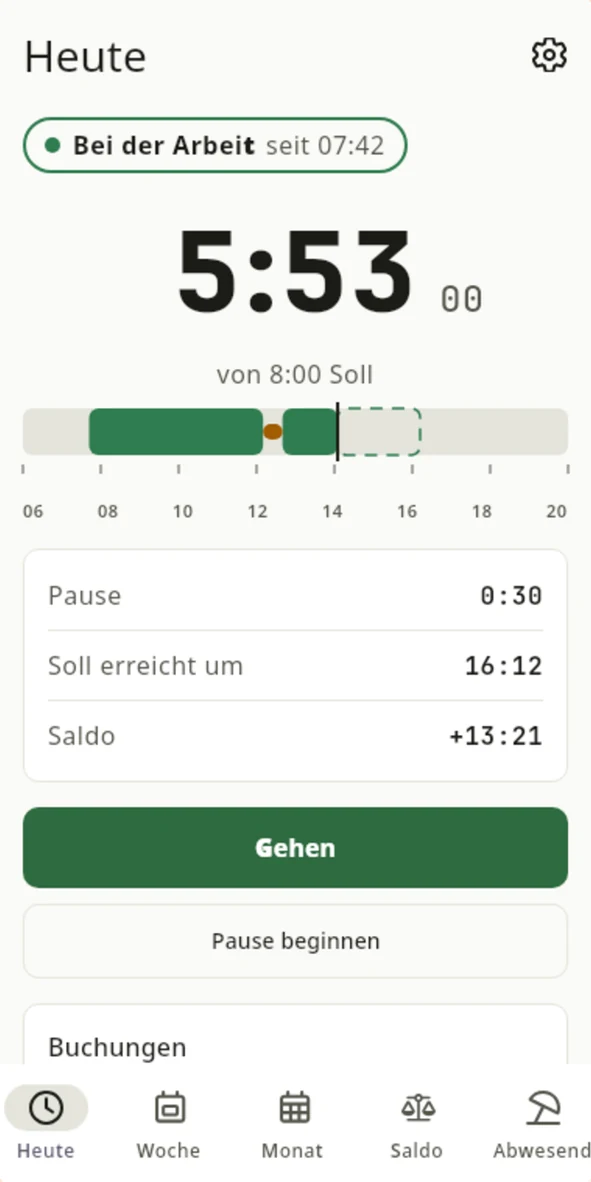
Time worked today, breaks, target and balance appear on the first screen. There are three views to choose from: rings, timeline or large numbers, each in light or dark.
The app records leave, sick days and time off in lieu together with working time, so the balance is right even in weeks with days off.
Your employees can fully record a past working day with several breaks after the fact, and fill a gap with a reason. Clear hints show what is still missing.
Public holiday calendars are available for 17 countries, and rule profiles for working time in Germany and Austria. The app speaks 13 language variants, from German to Swedish.
For small teams without a company system: your employees use the app without an account or server, even offline. For the office, there is CSV, PDF and a signed working time report.
App on Google PlayTarget hours, public holidays, absences and balance come from Workspace. Every entry arrives in the company system immediately, and team leads and HR handle leave and corrections traceably in Workspace.
Time and leave in WorkspaceYour team clocks in in the browser: clock-in, break and clock-out in their own profile, plus leave, absences and approvals in the same system.
View WorkspaceYou set up your employees in Workspace, with their employment contract and target hours.
The employee opens their profile in Workspace and selects “Connect app” under Sessions.
They scan the QR code with the app and confirm the comparison code shown by the browser and the app at the same time.
From now on, every entry goes live to Workspace, and team leads and HR see hours, balance and requests.
In connected mode, Workspace’s time counts, not the phone’s. All entries are therefore based on the same clock.
A correction appears with its reason as a separate entry alongside the original records.
Workspace manages target time, balance, public holidays and absences. The app shows each employee exactly this status.
The app works without location data, advertising or usage analytics. Details are in the privacy policy for schukai Time Tracking.
In connected mode, they sign in via their Workspace profile and pair the app using a QR code. On its own, the app runs without any account at all.
When connected to Workspace, schukai Time Tracking is included in your Workspace licence. Your employees do not need to make their own purchase on Google Play.
Yes. In Workspace, they record clock-in, break and clock-out in their profile. The app is an additional option on the move.
They add it afterwards with a reason. The correction appears as a separate entry in the history, and you handle corrections traceably in Workspace.
Employers in Germany must record their employees’ working time, according to the Federal Labour Court’s decision of 13 September 2022. The app and Workspace make this recording simple. Your legal adviser assesses your individual case.
In companies with a works council, introducing time tracking is generally subject to co-determination. A useful point for the discussion: the app records working times and absences, but does not collect location data.
Whether paper slips, spreadsheets or an old time clock: tell us how it works today. We show you how your people will clock in by app tomorrow while you keep the overview.