Hours recorded directly
Your team clocks in in the browser or with the app. At the end of the month nobody types up paper timesheets.

Products · Workspace
Your employees record working time and request holiday in one place, in the browser or with the app. Team leads decide on requests, HR sees balances and holiday accounts. Every change is a separate entry in the system, so nobody has to recalculate later.
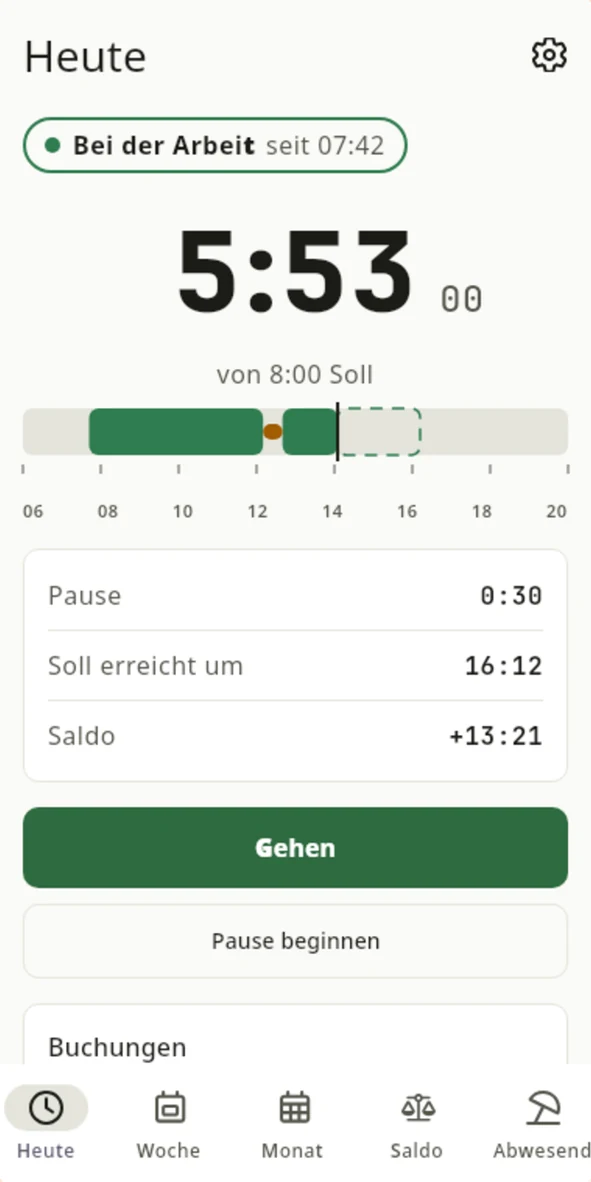
The schukai Time Tracking app with sample data.
Your team clocks in in the browser or with the app. At the end of the month nobody types up paper timesheets.
Public holidays and holiday are credited, and corrections are logged in the journal with a reason.
In Workspace, team leads approve holiday requests, and the holiday account is always up to date.
Times, absences and holiday are checked and exported for your payroll software or your tax adviser.
Your employees record start of work, breaks and end of work in their profile. The server’s time counts, not the device’s.
Target hours come from the employment contract. Part-time and full-time staff are therefore calculated with the correct value.
Everyone sees their hours for today, the week and the month, along with the deviation from the target.
Public holidays and approved paid absences are credited. So nobody slips into the minus on a public holiday.
If an entry is missing, it is added later as a separate entry with a reason. Workspace never silently overwrites an existing entry.
The journal lists all entries and corrections. Anyone asking later can see what was recorded and when.
With the Android app schukai Time Tracking, your employees record arrival, breaks and departure on their own device. To connect, the employee opens their profile in Workspace, selects “Connect app” under Sessions and scans the QR code shown. They then compare a code in the browser and the app and confirm the connection.
Once the app is connected, Workspace manages entries, target hours, balance, public holidays and absences. Every entry goes straight to Workspace and carries the server’s time. Without a network connection, the connected app does not record. It then shows the last loaded status and does not silently submit entries later. Neither the app nor Workspace records location data.
The app also works without Workspace. In that case it stores all times on the device and also records offline.
The employee selects the type of absence and the period in their profile. The request reserves the days in the holiday account, and they see immediately how much holiday they have left.
Their direct manager sees the request in team time tracking, together with the team calendar.
The manager approves or declines. If a request is left pending, Workspace sends a reminder.
Once approved, the holiday counts as taken and is credited in working time.
Each employee has a separate account for each year with the entitlement from their contract.
Open requests reserve days, approved ones use them up. The remaining available days follow from this.
HR records remaining holiday from the previous year, additional days and corrections as separate entries. This means the balance can be traced at any time.
If the contract changes, existing annual accounts stay unchanged. HR records any difference as a correction.
Team leads see who is away and when. Staffing notes help when deciding on a request.
If an employee falls ill during approved holiday, HR handles the case separately. Holiday used is corrected via the holiday account.
Team leads see the working times and requests of their direct reports and decide on holiday. Contract details, holiday account corrections and payroll data remain reserved for HR. You determine who approves which request via the direct manager. In addition, you maintain your teams with sub-teams and members. This team list describes your structure but does not grant any permissions.
Workspace prepares the data for payroll: times, absences and holiday are checked for completeness, approved and exported, regardless of your payroll provider. Workspace does not run payroll itself. That stays with your payroll software or your tax adviser.
On request, Workspace checks recorded times against rule packages for Germany, Austria and Switzerland in the general case, for example for maximum working hours, breaks and rest periods. Anomalies appear as notes. Clocking in continues regardless, even if information required for the check is missing. You activate the applicable rule package yourself after reviewing it from a professional standpoint.
You also use the teams from HR for revenue targets and sales reports.
View sales and customersTasks, calendar and wiki sit in the same system as working time and holiday.
View collaboration and knowledgeYou set up approvals and key figures for all areas according to the same rules.
View processes and reportsNo. Clocking in also works in the browser. The schukai Time Tracking app is an additional option for Android devices.
Not when it is connected to Workspace. Without a network, the connected app does not record, so that every entry carries the server’s time. Without a connection to Workspace, the app also records offline on the device.
Workspace prepares times, absences and holiday and exports them for your payroll software or your tax adviser.
Employers in Germany must record their employees’ working time, according to the Federal Labour Court in its decision of 13 September 2022. Workspace helps with recording and checking. Whether your recording meets all obligations is something to clarify with your legal advisers.
In businesses with a works council, introducing time tracking is usually subject to co-determination. Workspace does not record location data, neither in the browser nor in the app. Clarify the details with your works council.
Rule packages for Germany, Austria and Switzerland with the general rules. We discuss any specifics of your industry or your contracts with you before implementation.
We give you the price in a quote, because it depends on the scope, for example the areas used and the storage. We will publish fixed prices as soon as they are set.
Whether timesheets, holiday requests by email or payroll preparation: show us your process. In a demo you will see how it runs in Workspace.